Cloud digital signage for any screen with a modern browser.
Sheencast turns a TV or monitor with a modern web browser into a managed screen: most smart TVs from 2020 on, or any TV with a Fire TV or Google TV stick. Build playlists, schedule content and push updates in real time, all from one dashboard.
No hardware to buy and no app to install. A screen just opens a web address, which most smart TVs and streaming sticks can do. Check yours.
Digital signage software built to run unattended.
Set your screens once and let them play. Sheencast keeps content fresh, recovers from network drops on its own, and tells you exactly what played.
Any screen with a modern browser, paired in seconds
An 8-digit code turns a modern web browser into a screen: a Fire TV Stick, a Chromebook, a Raspberry Pi, Android TV, or a browser on Windows or a Mac. No proprietary hardware, no lock-in. Then fill it with anything: images, video, PDFs, web embeds, live data feeds and reusable templates, all in one shared library.
Schedule it, then leave it alone
Group content into playlists with per-item durations and assign them to screens or groups by priority. Where two overlap, the higher one plays, so there's nothing to untangle. Changes appear on-screen instantly, screens cache everything locally so playback continues through a network drop, and screens in a group update together.
Know exactly what played
Proof-of-play analytics show total plays, air-time and uptime for every screen and every item, with a CSV export whenever you need a report. Underneath it all: role-based access for your team, and every change is recorded with who made it and when.
Start from a template.
Each card is the template as a screen shows it, with the sample text it ships with. Every one is included on every plan, the free one too.


Your content, not just our templates.
Upload your own artwork, photos, video or a PDF, or paste a YouTube or Vimeo link, and schedule it like anything else in the library.
Images and video you upload
JPEG, PNG, GIF and WebP up to 25 MB each; MP4 and WebM up to 100 MB. Everything is stored with your content and cached on the screen, so a promo graphic or a product video keeps playing if the network drops.
PDFs and video links
Upload a menu, price list or event program and each page becomes a slide, up to 50 pages. The conversion runs in your browser, so the PDF never leaves your computer. Or pick YouTube or Vimeo, paste the link, and it plays in the rotation with no download, no re-encoding, and nothing counted against your storage.
One library, with room to grow
Uploads live in the same library as templates, embeds and live data, and use the same playlists, schedules and proof-of-play reports. 5 GB of storage on the free plan, 100 GB on Pro and 500 GB on Business, shared across your whole library.
Three steps to a live digital signage screen.
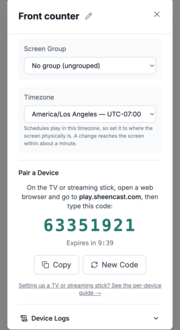
Add your first screen
Create a free account at app.sheencast.com and add a screen. You'll get an 8-digit code, valid for 10 minutes.
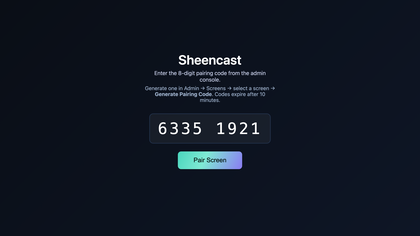
Type the code on the screen
Open the web browser on your TV or streaming stick, go to play.sheencast.com, and type in your code.
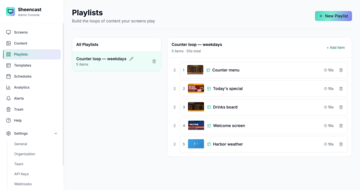
Choose what plays
Put your images, videos and menus in a playlist, set the days and times, and it starts playing.
Digital signage pricing: three screens free, forever.
It isn't a trial, and there's no sales call. Run it on your own screens for as long as you like, and upgrade when you need a fourth.
Free
$0forever
Enough to run a real screen in a real location.
- Up to 3 screens
- 5 GB of media storage
- 2 team members
- 1 API key
- All templates
- Webhooks
No credit card, no expiry.
Pro
$29a month
For more than three screens.
- Up to 25 screens
- 100 GB of media storage
- 10 team members
- 5 API keys
- All templates
- Webhooks
Upgrade any time from Settings → Billing.
Business
$99a month
For networks that outgrow Pro.
- Unlimited screens
- 500 GB of media storage
- Unlimited team members
- 20 API keys
- All templates
- Webhooks
Upgrade any time from Settings → Billing.
Prices are in US dollars, billed monthly.
Most digital signage is sold per screen: published rates run from $5 to $24 per screen per month, checked August–September 2026. Sheencast charges per plan, so adding a screen costs nothing until you cross a tier. See the working.
Ready to light up your screens?
Make an account, open play.sheencast.com on the TV and type the code. That's the whole setup.